
The employee directory for Microsoft Teams that finds the right expertise.
What your business gains
An employee directory for Microsoft Teams that supports better-informed decisions.
Benefit from career experience across departments and countries, understand organizational responsibilities, and get workforce answers with less manual preparation. TeamConnect AI combines information from your existing systems with skills, career experience, and profile details employees add. Use it inside Microsoft Teams, Microsoft Outlook, and Microsoft 365 Copilot, with access governed by role.
Search
Search the employee directory by skill, experience, and language.
Identify colleagues with relevant experience before finalizing a proposal or recommendation—not just the people already in your network. Combine skills, certifications, language, and location in the employee directory, or ask the AI agent about career and project experience, including previous employment. Review the profile behind a match to decide whom to approach.

Skills & certifications
Assess the skills and career experience behind a match.
Understand why a colleague may be relevant before approaching them. Profiles combine information from existing systems with skills, certifications, and career details employees contribute, including experience from previous employers. Supporting documents and validation details, where available, help you assess the match. Selected supported skills can also be synchronized with Microsoft 365 profiles.

Availability
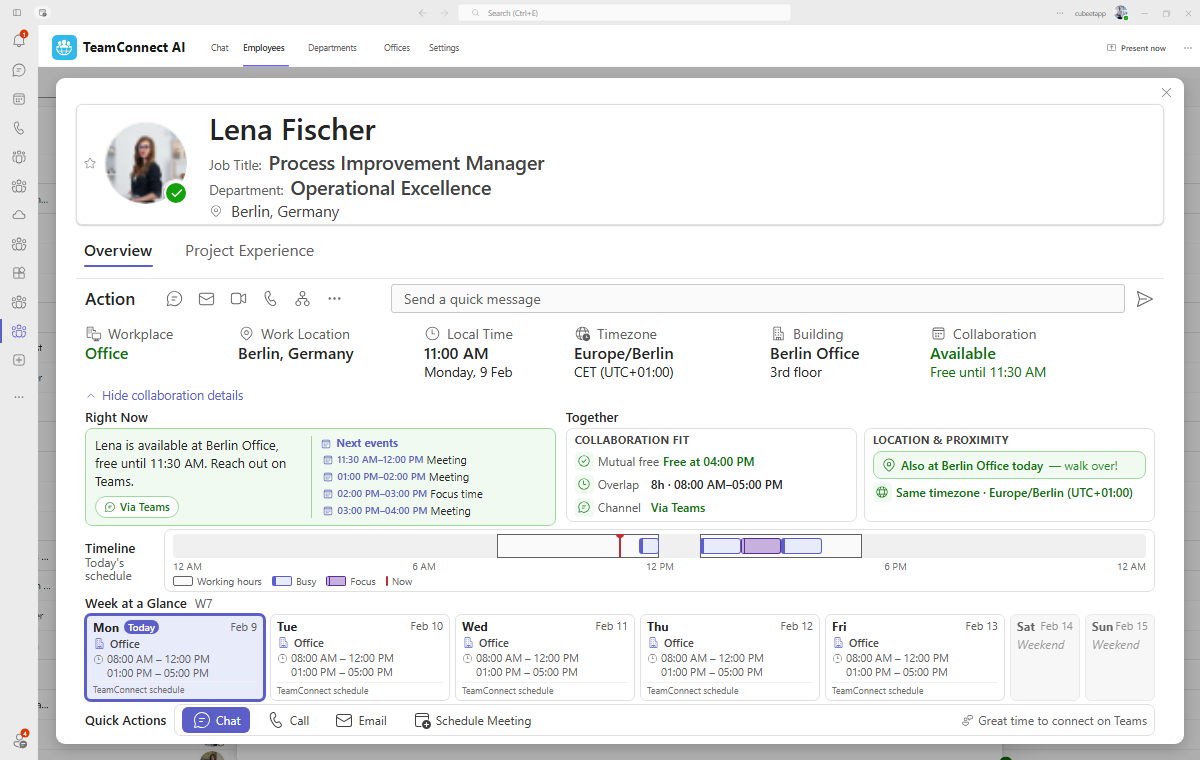
Employee availability and presence in Microsoft Teams.
Choose an appropriate time and way to approach a colleague. See Microsoft Teams presence, local time, working hours, work location, and calendar context, drawing on Microsoft Outlook, Microsoft Shifts, and Microsoft Places where used. Decide whether to call, send a message, or wait until their working day.
Scheduling & circles
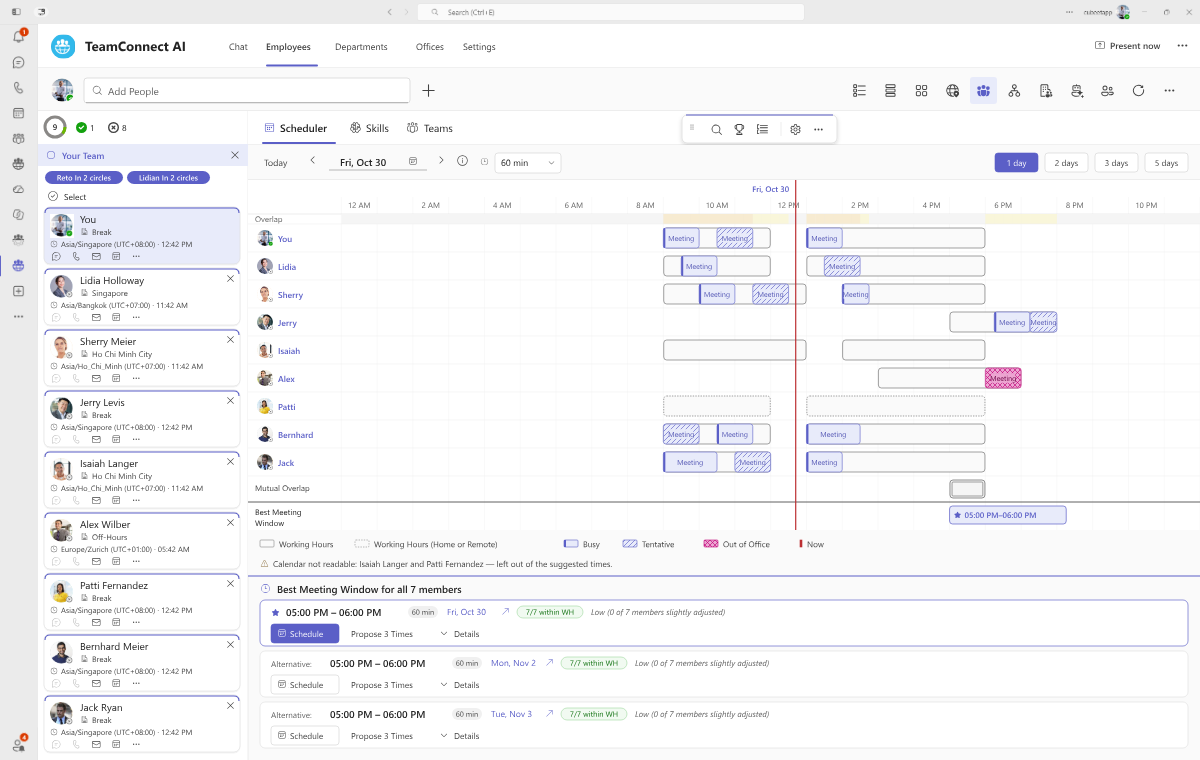
Meeting scheduling across time zones, with less back-and-forth.
Coordinate a discussion without checking each calendar and time zone separately. Build a circle from favorites, your team, a department, a Microsoft Teams channel, or a chat group. Compare meeting windows, see whose working hours are affected, and propose times or send an invitation without leaving Microsoft Teams.
AI agent & org intelligence
Get workforce answers from an AI agent governed by role.
Reduce repeated information requests and manual report preparation. Employees can discover relevant colleagues; managers can ask about their teams; HR and executives can explore workforce information across all organizational dimensions, down to departments and affected employees. Agent Roles govern which questions the agent can answer and what it can disclose within each person’s scope, with references to the underlying records.
AI Agents & Governance →
Org chart
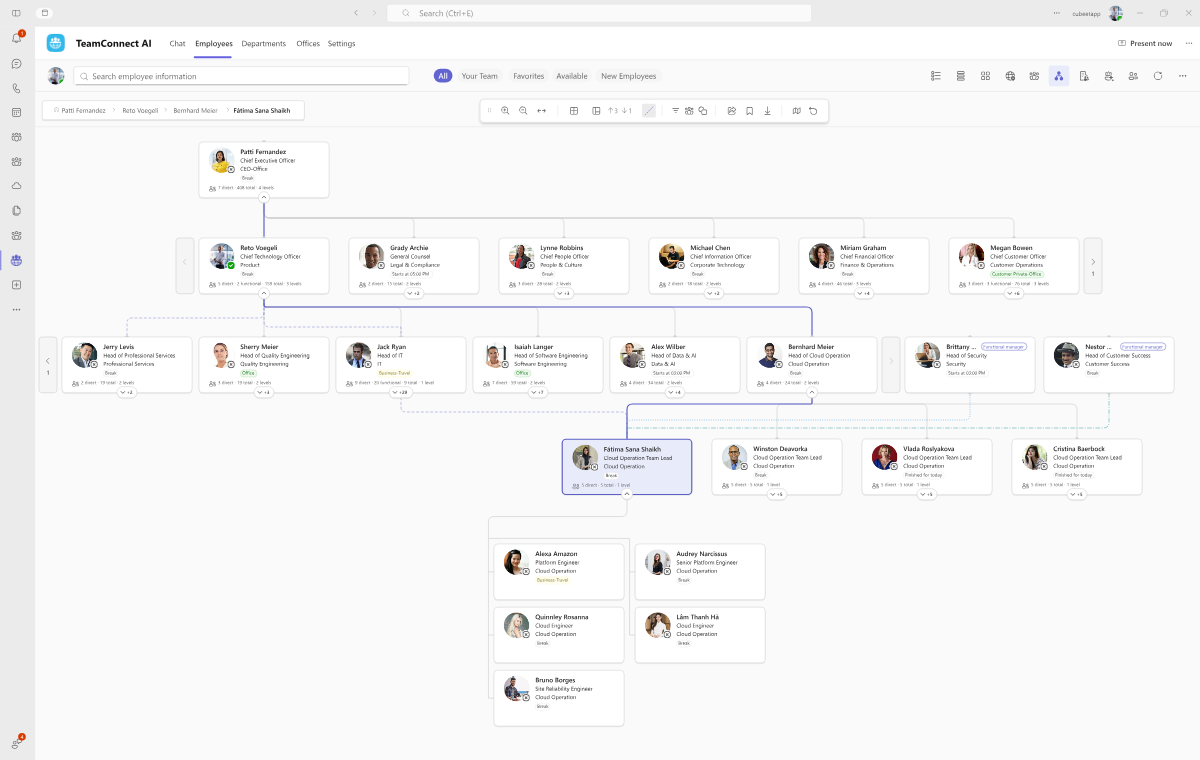
Org charts that clarify responsibilities and matrix reporting.
Understand whom to approach and how their responsibilities relate to the wider organization. Explore job roles, functions, organizational levels, and direct or functional reporting relationships across employee, department, and office hierarchies. Open a profile from the org chart to see the person behind the position.
Directory and expertise
Department and office directories. Skills matrix with validation requests. Searchable work and project experience. Saved views, quick filters, column management, and filtered export. 30 grid fields plus 240 custom fields per directory, with 15 Microsoft Entra ID extension attributes mappable across employees, departments, and offices.
Collaboration and organization
Ten presentation modes including grid, cards, people, map, and collaboration. 50+ localized variants and 3,000+ cities for automatic time, work location, and regional context.
Administration and integrations
50+ connector templates across HRIS, ITSM, and enterprise architecture, plus Microsoft Power Platform actions. SCIM provisioning. Dozens of administration views.
People and digital workers
Discover useful digital capabilities—and the people accountable for them.
Find digital workers relevant to a task and understand their capabilities and accountable owners before deciding whether to use them. TeamConnect AI displays information from Microsoft Entra Agent ID alongside the employee directory. Agent identities stay managed in their source system, and opening an agent follows its host’s access rules.
Agent About · TeamConnect AI
Know whom to approach about a digital worker.
Identify the appropriate contact for a digital worker’s use or technical support. Its card shows advertised capabilities, the provider, and three distinct responsibilities: agent-user manager, identity sponsor, and technical owner. Colleagues’ usefulness ratings add context without replacing the host’s access rules.

Org chart · TeamConnect AI
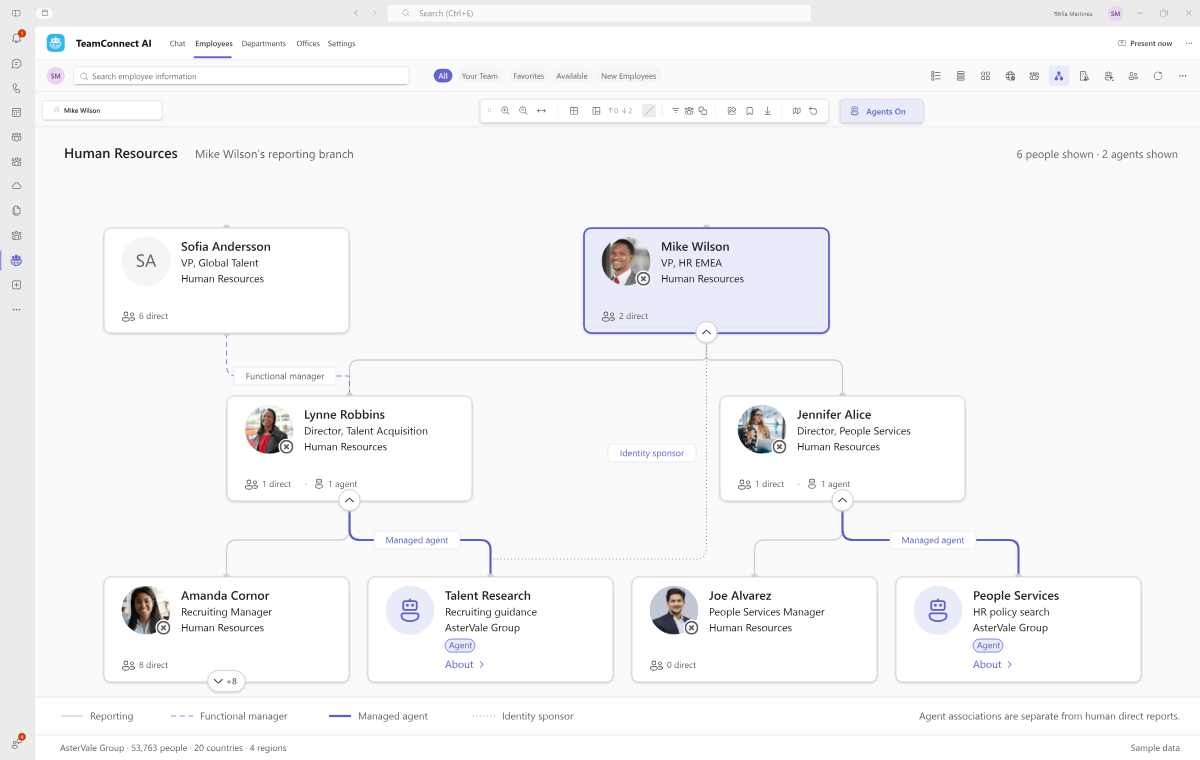
Digital workers in the org chart, beside the people accountable for them.
Managed agents appear in the organization chart as digital workers next to the people accountable for them, with digital worker associations kept separate from human reporting lines, so the chart shows who runs a digital worker without pretending it reports like an employee.
How it fits
Profile, org chart, and contact — without leaving Microsoft Teams.
Search finds the person, and then the profile shows the evidence. The org chart also shows where they sit. Finally, Instant Connect starts the chat, call, or meeting, and every step happens inside your Microsoft 365.
Where it happens
- Microsoft Teams
- Microsoft Outlook
- Microsoft 365 Copilot
- 01
Search
Skill, office, and language combined in one query
- 02
Profile
Validated skills, projects, languages, and evidence
- 03
Org chart
Direct and functional reporting lines
- 04
Instant Connect
Chat, call or meeting without leaving the window
Reads through
- Microsoft Graph
Included with TeamConnect AI
Workforce and license reporting, built into the employee directory for Microsoft Teams.
Make organizational and subscription decisions with the detail behind the totals, using the people and role information in your employee directory. Reduce repeated report preparation while keeping access within each user’s responsibilities.
Organization Insights
Workforce reporting down to departments and affected employees.
Understand workforce composition, headcount, FTE, estimated workforce costs, reporting relationships, and recorded changes across all organizational dimensions—down to individual departments and affected employees. HR and executive leaders can explore the detail behind a change within their role’s scope, without requesting another manually assembled report.

Subscription Analytics
Make license-renewal decisions with a clearer view of costs.
Connect subscription costs and license utilization to the people and roles they serve. Identify unassigned or unnecessary seats and review role requirements before renewing or purchasing more licenses. Use the findings to guide purchasing decisions; savings depend on the changes you make to purchases and renewals.

By role: workforce reporting for executive leaders · SaaS license spend for finance leaders · organization reporting for HR leaders · JML automation for IT leaders · the employee directory and JML automation together
Field-level data governance
Make people information useful without opening confidential records.
Let employees discover relevant colleagues while managers, HR, and executives access workforce information for their responsibilities. Visibility, editing, audience, and Agent Role settings define who can see or change information and what the agent may disclose. The controls below let you configure those boundaries for your organization.
Build the employee directory your organization needs.
Add up to 240 custom fields to each directory — employees, departments, and offices — plus 15 Microsoft Entra ID extension attributes. Your own fields follow the same visibility and edit rules as the built-in ones, so the directory fits your organization without waiting for a product change.
Can we switch off a field? Yes, per view: grid, small and large cards, profile, and export.
Can only certain people see it? Yes, by audience, such as HR, IT administrators, or Microsoft 365 security groups.
Can we change the order? Yes: the default column order, the card slots, and the profile sections. Employees can also arrange their own columns.
Can we add our own columns? Yes. Custom fields appear in the grid, on cards, in the profile, and in exports like any other field.

The first question IT asks
Subscribe, consent, sync. That is the install.
Five steps, because everything runs in tools your administrators already use. Deploy any countries, companies, offices, or departments — or your whole organization — and add more whenever you want.
Where it happens
- Microsoft Marketplace
- Microsoft 365 Admin Center
- Microsoft Teams
- 01
Choose your subscription
TeamConnect or TeamConnect AI from Microsoft Marketplace or the Microsoft Teams Store. First 30 days free, cancel any time.
- 02
Assign licenses
Then assign the purchased user licenses in your Microsoft 365 Admin Center.
- 03
Open the app
Afterward, find it in the Store inside Microsoft Teams and open it.
- 04
Approve and wait
Approve the Microsoft consent prompts. One click then creates the Microsoft SharePoint site collections for you.
- 05
Select, check and sync
Choose the scope. The Microsoft Entra ID Health Check reads that scope and recommends the settings; accept or change them, then sync.
What you never do
- No servers
- No agents to deploy
- No separate admin-center configuration
Then it is yours
Your directory is then ready to use. In TeamConnect AI, you can also configure roles and connect additional sources directly in the app’s settings. Return to the synchronization setup whenever you need to repeat a sync or include additional countries and locations.
Nothing left running on your side
Beyond subscription and license management, no further configuration is required in your Microsoft 365, Microsoft Entra ID, or Microsoft Azure admin centers. Cubeet maintains the application and its supporting services, so your team has no application infrastructure to deploy or maintain.
For evaluators
The four questions security asks first.
The answers your platform owner, CISO, and procurement team need before a pilot starts.
Stored in your own tenant
Your people and organization records live in SharePoint Online site collections created inside your own Microsoft 365 tenant during setup. There is also no intermediary Cubeet database holding your directory, and those site collections follow the same retention, backup, and access policies as the rest of your Microsoft SharePoint content.
Microsoft Graph exclusively
Microsoft 365 data access is exclusively through Microsoft Graph. Connected HR and enterprise systems use the integration routes, field mappings, and synchronization rules your administrators configure.
Not used for AI training
The AI agent sends your prompt and its answer through Cubeet’s Microsoft Azure backend to be answered. Neither is used to train foundation models. Training and retention are separate questions, so for your security review, we document which services are used and what each keeps.
Billed through Microsoft
Bought through Microsoft Marketplace or the Microsoft Teams Store. Licensing and billing run in your Microsoft 365 Admin Center and Microsoft Azure subscription, so procurement uses a route it already approved.
Buyer questions
Employee directory questions enterprise teams ask first.
The questions that come up in every evaluation of this product, answered directly.
About the employee directory for Microsoft Teams
We already have HR systems and an employee directory. What would we gain?
A way to benefit from career experience across the business and reduce repeated requests for workforce information—not just another contact list. Employees can identify relevant colleagues beyond their immediate network; managers and leaders can understand responsibilities and explore organizational changes within their scope.
TeamConnect AI combines information from existing systems with employee-contributed profile details. Your HR systems remain the systems of record for their own employee records, while role-governed access makes relevant information useful beyond HR.
Is TeamConnect AI an employee directory for Microsoft 365?
Yes. TeamConnect AI is an employee, department, and office directory inside Microsoft Teams, Microsoft Outlook, and Microsoft 365 Copilot. It helps your business benefit from career experience beyond current job titles and obtain role-appropriate workforce answers with less manual preparation.
Those three are where it runs, while it integrates directly with the rest of your Microsoft 365. Communication: Microsoft Teams chat, group chat, call, video, Meet Now, and channels. Workplace: Microsoft Outlook calendar and email, Microsoft Places, and Microsoft Shifts. Identity and administration: Microsoft Entra ID, Microsoft Entra Agent ID, Microsoft 365 security groups, and the Microsoft 365 Admin Center. Profile and content: Microsoft People, the Microsoft 365 user profile, and Microsoft SharePoint Online.
How does TeamConnect AI complement Microsoft People, Org Explorer, and Microsoft 365 Copilot?
TeamConnect AI extends the value of your Microsoft investment by bringing career experience, organizational responsibilities, and role-governed workforce answers into the environment employees already use. Its employee directory and AI agent work inside Microsoft Teams, Microsoft Outlook, and Microsoft 365 Copilot.
Configurable synchronization keeps selected supported fields aligned with Microsoft Entra ID and Microsoft 365 profiles. You choose the fields and synchronization directions, while your existing Microsoft services remain in place. The result is richer people information in the Microsoft environment you already use, alongside TeamConnect AI’s role-governed directory experience.
Role-based control and organization size
What is role-based information control, and why does it matter?
Role-based control lets people benefit from relevant workforce information without receiving identical access to every employee record. An employee can discover a colleague’s professional experience; a manager can ask about their team; an HR leader can explore workforce composition and changes within their organizational scope. Agent Roles determine what may be returned, compared, and disclosed.
Is TeamConnect AI only for very large organizations?
No. The value depends on your organizational needs, not only headcount. A business spread across departments, locations, or countries may benefit from discovering relevant career experience, understanding matrix responsibilities, and obtaining workforce answers without repeated manual preparation.
You can begin with relevant companies, locations, or departments and expand the scope as needed. Matrix reporting, field governance, and employee-contributed career information support complex organizations without requiring every user to have the same access.
Licensing and budget
Does TeamConnect AI need new budget?
TeamConnect AI is a purchase to evaluate against the value it delivers. Include the subscription and expected AI usage in your business case; an existing Microsoft purchasing route does not remove the need for budget approval. Confirm the applicable purchasing and billing terms during your evaluation.
Can we mix TeamConnect and TeamConnect AI?
Yes. The two are compatible, so each person can be licensed on the edition their work needs, for example TeamConnect for most employees and TeamConnect AI for management, sales, and roles that work across departments. Because TeamConnect AI includes the TeamConnect foundation, nobody needs both.
Your HR data in the employee directory
Where does TeamConnect AI get its data?
The directory can start with Microsoft Entra ID and be enriched through the Employee Import Hub and Integration Hub using your HR and other connected systems. Administrators configure source ownership, field mappings, and synchronization schedules. Each HR system remains the system of record for its own employee records.
Employees add profile details such as skills, career and project experience, biographies, and certifications, subject to the configured editing rules. Selected fields can be synchronized back to Microsoft Entra ID, while role-governed access determines who can use the information in TeamConnect AI.
How long does it take to connect several HRIS systems?
Timelines depend on the sources, available interfaces, identity matching, field ownership, data quality, and access requirements. Connector templates help structure the setup, but each source must be mapped and tested against your requirements. Agree the rollout scope and acceptance checks during your evaluation rather than assuming the same duration for every HRIS.
How does TeamConnect AI integrate with Workday, SAP SuccessFactors, and other HR systems?
Use the Integration Hub’s connector templates and the Employee Import Hub’s file imports to consolidate people information without replacing your HR systems. Configure field mappings, source ownership, and schedules so updates can reach the directory without repeated manual entry. The available interface and permissions for each HR system determine the appropriate connection method.
Data quality and where your data is stored
What is included in the free Microsoft Entra ID Health Check?
The Microsoft Entra ID Health Check produces a PDF assessment of the people information in the selected directory scope. It covers identity, job information, managers, departments, department managers, offices, and contacts, highlighting completeness and consistency issues with examples. Use it to review source data and synchronization settings before publishing information to your employee directory.
How do I see which records are incomplete, without opening each one?
The TeamConnect Health Check, under HR Operations, scores every field across the whole population, for example how many records carry a job title, a cost center, a manager, or a photo. Below the scores, it lists who is missing what, with a completion percentage for each person, so the gap goes to whoever maintains it instead of staying in a dashboard.
It is a different check from the Microsoft Entra ID Health Check, because that one scores Microsoft Entra ID, while this one scores TeamConnect AI.
Where is our data stored, and what runs outside Microsoft 365?
Your people and organization records are stored in SharePoint Online within your own Microsoft 365 tenant. TeamConnect accesses those records directly through Microsoft Graph, with no intermediary Cubeet database. TeamConnect AI also adds processing hosted in Microsoft Azure for the AI agent and automated imports, exports, synchronization, and API integrations, under the permissions you grant.
Bring a real people or workforce question
See your organization in the employee directory for Microsoft Teams.
Bring a people or workforce question your business struggles to answer today. In a thirty-minute demo, explore relevant career experience, organizational responsibilities, or workforce changes within the appropriate role. The Microsoft Entra ID Health Check provides a separate starting point for reviewing directory data quality. See a sample report. Weighing the cost? See the business case first.